Alan Danbury - PC Support
Security tips when using the Internet
Firewalls
A Firewall is a piece of hardware or
software which filters messages
going out of and coming into your PC. Windows XP has a built in
firewall, but you need to ensure that it is switched on. If you are
running Service Pack 2, it is on by default. To check the status, click
on Settings, Control Panel, Windows Firewall.
If you have a broadband connection,
and particularly if you are sharing
this between several computers, you may have a router installed to
connect the machines. Most modern routers include a firewall, again,
check that it is enabled. The configuration screens for most routers
are accessible using any Web browser, just point your browser at the
default gateway address. This is usually 192.168.0.1, or 192.168.1.1 or
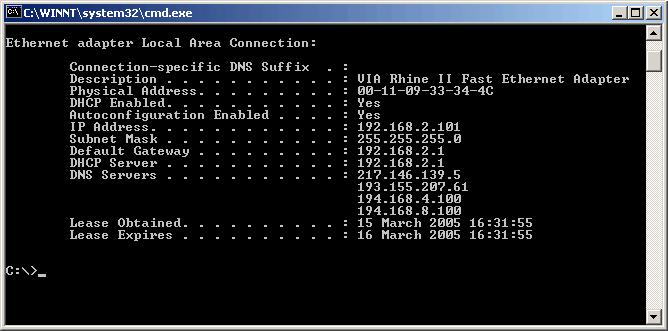
192.168.2.1. To check which address is being used on your network, go
to a Command prompt, and type in "ipconfig/all|more". The number you
need is the one shown as "default gateway". For detailed instructions
consult the manual that came with your router.
If you do not have a router, and are
not running Windows XP, there are
a number of software firewall programs available. The best known one of
these is probably ZoneAlarm. This can be downloaded from Zone
Labs Web site and is free for
personal use.
Back to
Top
Back to Help Index